Free · no sign-up · works offline
A chess timer online that keeps working when the Wi-Fi does not
Set the device down between the two of you and tap your own half when your move is done. Eleven presets, Fischer increment, both kinds of delay, and real multi-stage tournament controls — all of it running on your own device, none of it costing anything.
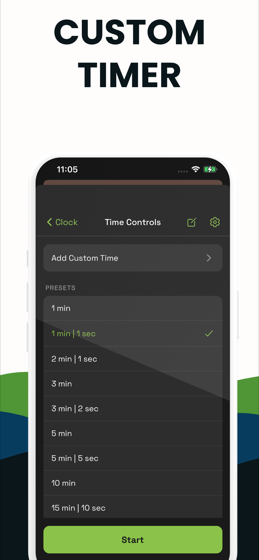
- Eleven quick presets from 1 minute to 30, plus any control you build yourself
- Fischer increment, simple delay, Bronstein delay, hourglass, or nothing at all
- Multi-stage tournament controls that add the next period to the time you saved
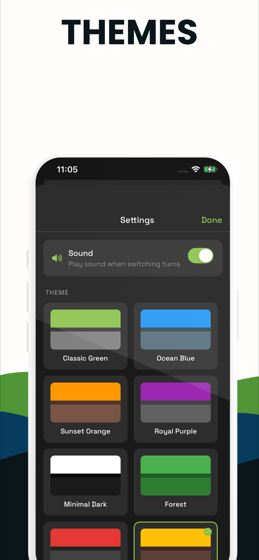
- Sixteen themes, a per-side move counter, ±10s arbiter corrections and full screen
- No account, no ads, no upload, no time limit — and it runs with the network off
Nothing leaves this tab. The clock is JavaScript running on your own device. No account, no upload, no ads, no time limit — and once the page has loaded it keeps working with the Wi-Fi off.
What this clock does that a stopwatch cannot
It reads from both sides
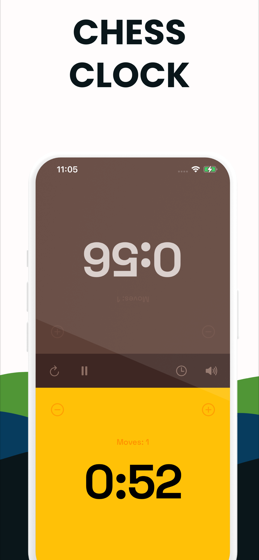
The top half is upside down on purpose, so the player sitting opposite sees their own clock the right way up. Turn that off in settings if you are both on the same side of the table.
It does not drift
Time is measured from real timestamps rather than counted in ticks, so a slow frame or a busy browser cannot quietly steal a second from you at bullet speed.
The screen stays awake
While a game is running the clock asks the browser to keep the display on. Nothing is worse than a phone locking itself in the middle of a scramble.
It stops when you look away
Switch tabs and the clock pauses rather than running down behind your back. Come back, press play, and carry on.
How it works
Three taps and you are playing
No sign-up, no settings to wade through. The default is a 5 minute game with a 5 second increment, which suits almost any casual blitz game.
Pick the time control
Tap the clock icon for the presets. Blitz players want 3|2 or 5|5, club players 10|0 or 15|10, and anyone playing a rated game wants the tournament list. Build your own if none of them fit.
Put the device between you
Landscape on a laptop, portrait on a phone. Each player owns the half nearest them, and the far half is rotated so it reads correctly from across the board.
Move, then press
Make your move on the real board first, then tap your own half of the screen. That ends your turn and starts your opponent's clock. Press with the same hand you moved with.
Play until a flag falls
The side on move is lit; the other is dark. At zero the clock stops, that half turns red, and the winner is named. Press reset for the next game.
Free, in your browser
Every clock on this site
Same engine underneath, set up for a different game. Pick the one that matches what is on the table.
Two players, one phone
Lay the device flat between you. Each player taps their own half, and the far half is rotated so it reads correctly across the board.
Open it FischerIncrement clock
Any base time plus Fischer seconds per move, with the added time flashing on screen so you can see the increment doing its job.
Open it DelayDelay clock
Simple US delay and Bronstein, both implemented properly — not faked with increment. Set G/30 d5 in one tap.
Open it BlitzBlitz timer
Preloaded with 3|2 and the rest of the blitz family, with tenths under the wire and a beep through the last ten seconds.
Open it BulletBullet timer
One-minute games with tenths showing from the very first second and presses that register the instant your finger lands.
Open it RapidRapid timer
10|0, 15|10 and the rest of the rapid family, with a live estimate of the longest a game can run so you can plan a round.
Open it Multi-stageTournament clock
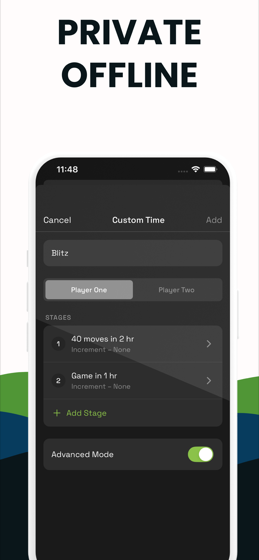
Real multi-stage controls. Reach move 40 and the next period is added to the time you saved, exactly as a hardware clock does.
Open it OfflineOffline clock
Load the page once and turn the network off. Nothing about your game is uploaded, because there is nowhere for it to go.
Open it Any gameBoard game timer
The same clock, pointed at any two-player game. Give each side a time bank and stop one player thinking the evening away.
Open itThe app
The same clock, in your pocket
The web clock is for the device you already have open. The app is for the one you carry to the club — it launches instantly, remembers your controls, and never needs a browser or a signal.
Learn
Guides
Straight answers to the questions people actually ask about chess clocks, then how to set it up in thirty seconds.
How to use a chess clock
Who presses first, which hand to use, when to press, and what happens when a flag falls. The whole thing, once, properly.
Read it Getting startedHow to set a chess clock
Digital, analog and app. What to set, in what order, and why every brand hides it behind a different mode number.
Read it Getting startedWhy is my clock counting up?
Almost always the wrong mode — but sometimes it is increment doing exactly what it should. A diagnostic table.
Read it Time controlsChess time controls explained
3+2, G/30 d5, 40/90 SD/30. Every notation you will meet, decoded, with a table of what each one feels like to play.
Read it Time controlsWhat is increment in chess?
Seconds added every move, why Fischer proposed it, and the arithmetic that lets a fast player finish with more time than they started.
Read it Time controlsDelay vs increment
One adds time you keep, the other only protects what you have. Three systems compared, with the arithmetic for a ten-second think.
Read it Time controlsWhat is Bronstein delay?
Your clock falls, then gives back what the move cost you. Why it exists, and why it ends up identical to simple delay.
Read it Time controlsWhat does 3+2 mean?
Three minutes plus two seconds a move — and a table decoding every other control written the same way.
Read it Time controlsWhat does 15|10 mean?
FIDE's standard rapid control, what it costs an organiser in round length, and how it compares to 10+5.
Read itFAQ
Questions people actually ask
Is this chess timer really free?
Yes. Every clock on this site is free and unlimited, with no account, no ads and no trial. It is JavaScript running in your browser, so there is nothing to pay for on our side either — no servers touch your game.
The iPhone and Android apps are a separate thing: they are free to download and show a premium unlock after a few starts. If you only want a clock in a browser, you never need to leave this page.
How do I use a chess clock?
Make your move on the board, then press your own side of the clock with the same hand you moved with. That stops your time and starts your opponent's. The side that is lit is the side thinking.
At the start of a game the clock is idle. Whoever presses first hands the move to the other player, so in the normal case Black presses to start White's clock.
What does 3+2 mean in chess?
Three minutes each on the clock, plus two seconds added to your own clock every time you complete a move. It is the standard blitz control at FIDE events, and the second number is always seconds even when the first is minutes.
What is the difference between increment and delay?
Increment adds seconds to your clock every move, so you can finish a game with more time than you started with. Delay only protects time — a countdown runs before your clock starts falling, and anything you do not use is gone.
This clock plays both, plus Bronstein delay, so you can watch the difference on the same position.
What happens when you run out of time in chess?
You normally lose. The exception is when your opponent has no way of checkmating you at all — with a bare king, for example, the game is drawn rather than lost. Which version of that test applies depends on whether the event runs under FIDE or US Chess rules.
Can two players share one phone as a chess clock?
That is exactly what this is built for. Lay the phone or tablet flat between you, and each player taps the half nearest them. The top half is rotated 180 degrees so it reads the right way up from the other side of the board.
Does this work as a tournament chess clock?
Yes, including proper multi-stage controls. Set 40 moves in 90 minutes with a 30 second increment, then 30 minutes for the rest, and the clock adds the second period to whatever you had left when your 40th move went in — the way a real tournament clock does.
Which side of the board does the chess clock go on?
By convention it sits to Black's right, next to the h-file, and in a FIDE event the arbiter has the final say. With a phone acting as the clock, it goes flat between the players instead, one half facing each of you.
Does the chess timer keep running if I switch tabs?
No, and that is deliberate. Browsers throttle background tabs, so a clock left running out of sight cannot be trusted. Switch away and this one pauses; come back and press play to resume from exactly where you were.
Do I need to install anything?
Nothing. There is no download, no extension and no sign-up. Once the page has loaded you can turn the network off entirely and the clock carries on, because everything it needs is already on your device.
If you would rather have an icon on your home screen, the free app does the same job without a browser in the way.