Free download
The Chess Timer chess clock app
A clock you carry rather than a page you find. Chess Timer opens straight into the board, remembers the control you played last, and works with the phone in aeroplane mode.
- Eleven presets from 1 minute to 30, plus custom time and Fischer increment
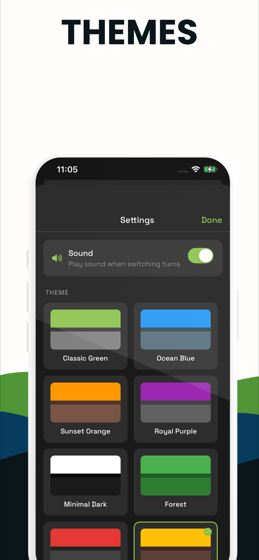
- Sixteen themes and four display fonts, so it is readable on any table
- Per-side move counters and ±10s corrections while the game is live
- Fully offline — no account, no signal, no waiting for a page to load
- Free on the App Store and Google Play
What the app does
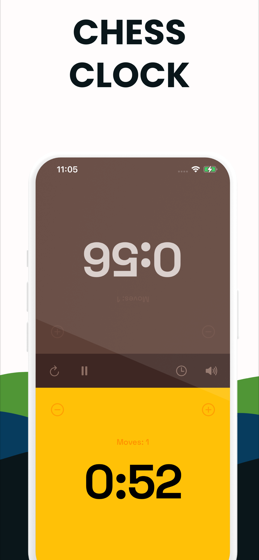
The same two-zone clock you can try further down this page. Tap your own half when your move is done and your opponent's clock starts. The top half is rotated so it reads correctly from the other side of the board, and the side on move is lit while the other stays dark.
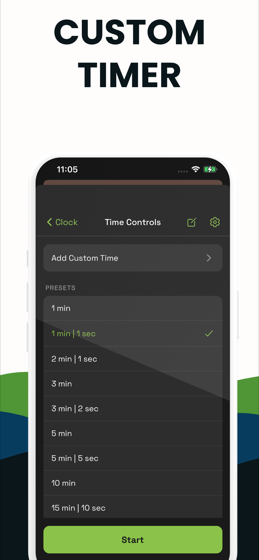
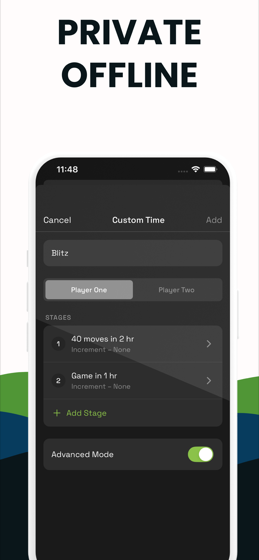
Eleven presets cover the controls people actually play: 1 min, 1|1, 2|1, 3 min, 3|2, 5 min, 5|5, 10 min, 15|10, 20 min and 30 min. Anything else you build yourself — name it, set the minutes and seconds, set the increment, and it is saved on the device.
What it does not do
Being straight about this saves everybody time. The app plays Fischer increment and single-stage controls. It does not play simple delay, Bronstein delay or a genuine multi-stage tournament control. If you need any of those, use the web clock on this site — it is free, unlimited, and works offline once loaded.
The app is free to download and shows a premium unlock after a few starts. The clocks on this website have no limit of any kind.
Which one you should use
| You want to | Use |
|---|---|
| Start a game right now on the device in front of you | The web clock |
| Play a delay or Bronstein control | The web clock |
| Play a real multi-stage tournament control | The tournament clock |
| Have a clock on your home screen for club nights | The app |
| Open a clock instantly in a venue with no signal | The app |
Privacy
The app plays entirely on the device. Your presets and settings live in the device's own storage and are not synced anywhere. There is no account, so there is nothing to sign up for and nothing to delete.
Try before you install
Try the clock before you install anything
This is the web build of the same clock. If the feel is right, the app is the same thing without a browser wrapped around it.
The app
What the app looks like
The clock in play, the preset list, the theme picker and the custom time editor.
FAQ
Before you download
Is the Chess Timer app free?
It is free to download on both the App Store and Google Play. A premium unlock appears after a few start and pause actions. The clocks on this website are free and unlimited with no unlock at all.
Does the app need an internet connection?
No. It plays entirely offline. There is no account, no sync and no server involved in running the clock.
Does the app support delay or Bronstein?
No — the app plays Fischer increment only. For simple delay, Bronstein delay or a multi-stage tournament control, use the delay clock or the tournament clock on this site.