Android
Chess timer app for Android
Chess Timer on Android is a clock and nothing more. No account, no feed, no permissions it does not need. Open it, pick the control, and start playing.
- Eleven presets plus custom time and Fischer increment, stored on the device
- Sixteen themes and four display fonts for readability on any table
- Per-side move counters and ±10s corrections during the game
- No permissions, no account, no connection needed
- Free on Google Play
A spare Android phone is a free chess clock
Most clubs have more boards than clocks. An old handset that still charges is a perfectly good chess clock: install the app, set the control, and hand it to a board that would otherwise play without one.
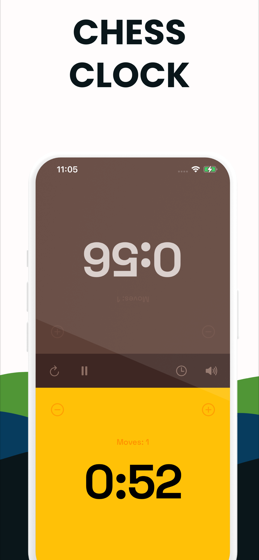
Lay the phone flat and each player takes the half nearest them. The top half is rotated so the player opposite reads their own time the right way up.
What you get
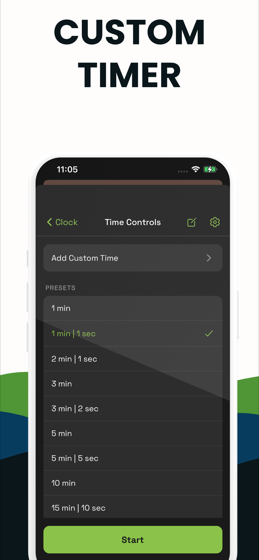
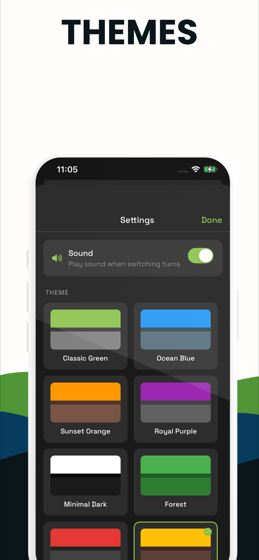
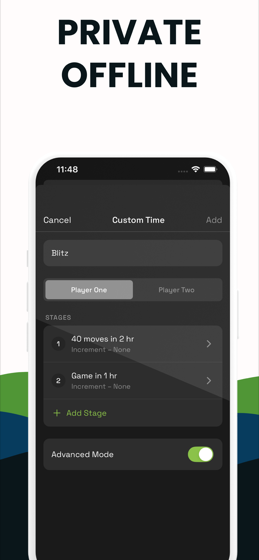
The preset list runs 1 min, 1|1, 2|1, 3 min, 3|2, 5 min, 5|5, 10 min, 15|10, 20 min and 30 min. Beyond that, build and name your own control with any base time and Fischer increment. Sixteen themes, four fonts, a sound on each press, move counters per side, and adjustment buttons for fixing a clock mid-game.
The honest limits
The app plays Fischer increment and single-stage controls only — no simple delay, no Bronstein, and no genuine multi-stage tournament control. It is free to download with a premium unlock after a few start and pause actions.
For delay controls or a real two-period tournament game, use the free web clock on this site. It has no limit and works offline once the page has loaded.
Android specifics
The app requests no permissions at all. It does not need the network, storage, location or anything else to count down two numbers, so it does not ask. Your presets and settings live in the app's own storage on the device.
Try before you install
Try it in this browser first
The clock below is the web build. Same layout, same behaviour — a decent way to see whether it suits you before installing anything.
The app
What Chess Timer looks like
The clock in play, the preset list, the themes and the custom time editor.
FAQ
Before you download
Is there a free chess timer app for Android?
Chess Timer is free to download on Google Play, with a premium unlock after a few starts. The web clock on this site is free with no limit if you would rather not install anything.
What permissions does the Android app need?
None. A chess clock does not need the network, your location, your storage or your camera, so the app does not ask for any of them.
Does it work without a connection?
Yes. Everything runs on the device. There is no account and no sync, so a dead zone makes no difference at all.